ezCater · Self-serve product design · Designed in Claude Design
Turning a week-long menu queue into a tool anyone can use
ezCater's restaurant partners waited up to a week for every menu change. I designed the self-serve menu editor that lets them make changes themselves, in one tool that also works for ezCater's internal menu experts, without slowing them down.
Try the working prototype →Outcome
ezCater was the only major food marketplace without self-serve menu editing. Three attempts stalled in discovery; the fourth made it to build.
- Ends a manual queue of about 7,200 updates a month. Internal teams handled every change, mostly by email, and partners waited up to a week. In the editor, changes go live the moment a partner saves. Partners waited up to a week. Now changes go live the moment they save.
- Designed while the platform was rebuilt. Design and research shaped how the new platform's data reaches partners. Having design at the table early and often meant partners were represented while the decisions were still being made. Design shaped how the new platform's data reaches partners, early enough to matter.
- Built to scale. ezCater's growth had outpaced manual menu work. The editor is the next step in the self-serve shift I led design on, after onboarding grew from 35% to 92% in six months. The next step after onboarding grew from 35% to 92%.
Behind the work
- Role
- Senior Product Designer, lead designer on the Self Serve team
- Team
- PM, UX researcher, about five engineers, content designer, analyst
- Partners
- ezCater's internal menu team and the Menu Core Services platform team
- Timeline
- 2025–2026
- Tools
- Claude Design (the first ezCater project delivered primarily in it), Figma
- Status
- Designed and validated with partners; in development
Every menu change waited in a queue
Every change went through a form and a week-long staff queue, so partners saved up edits and waits grew. That couldn't scale. Self-serve gave partners the control they'd wanted for years and freed the internal team.
Every change waited in a week-long staff queue. Self-serve gave partners control and freed the internal team.
This would save me from having to email three different people just to get one change made.
From expert tool to everyday tool
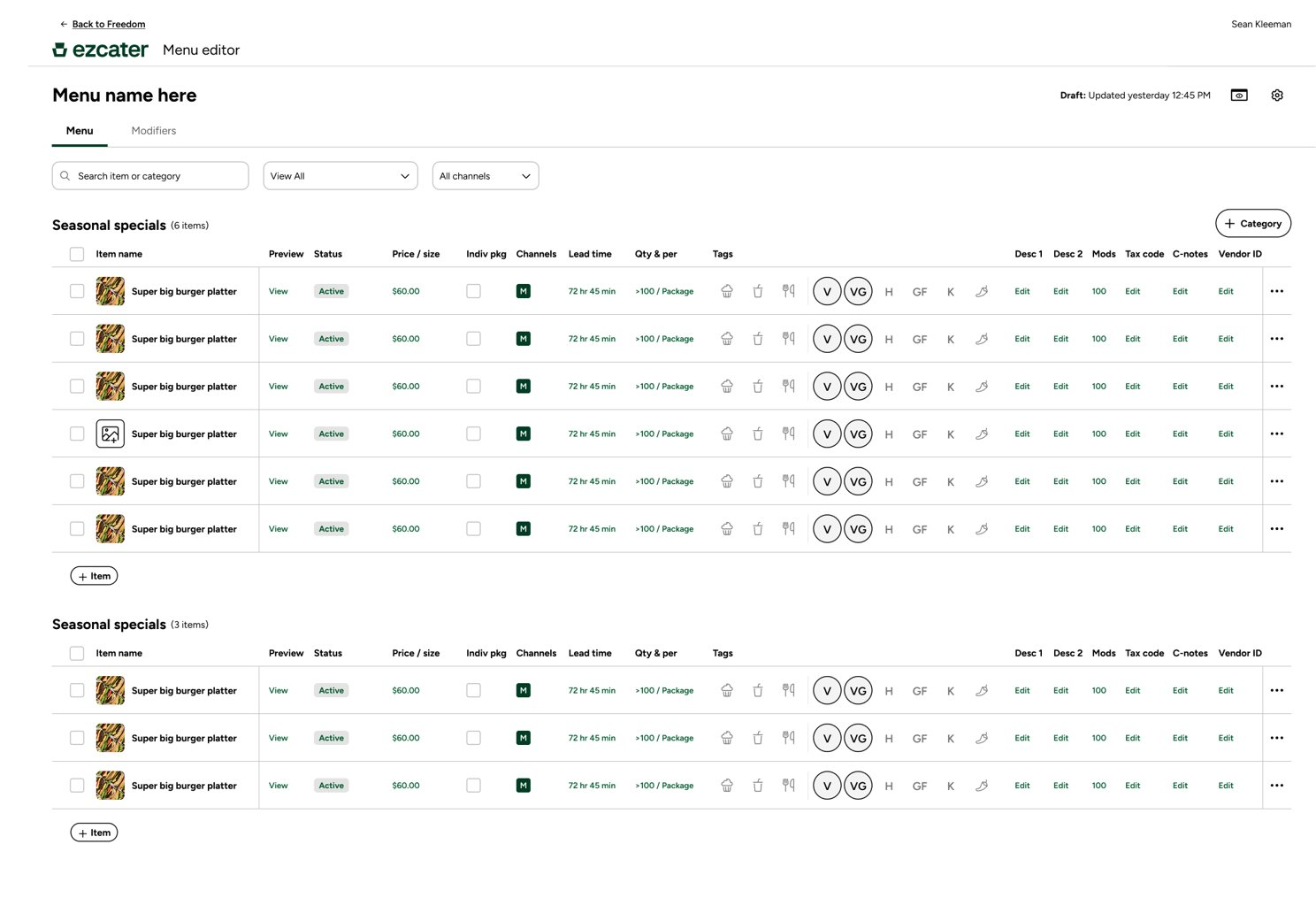
The original plan called for two editors: an internal tool for ezCater's menu experts and a simpler version for restaurant partners. I started with the internal tool, optimized for speed, with every control on screen. Then leadership accelerated the timeline and consolidated the plan into a single tool for both audiences, designed for partners first. I started over in Claude Design, which got me to a working prototype fast enough to keep pace with research and engineering.
I started with an internal tool for experts. When leadership merged the plan into one tool designed for partners first, I started over in Claude Design.
Four decisions that made complex menus simple
Catering menus hide a lot of structure: sizes, prices, servings, modifiers and rules. The goal was to make all of it editable without asking partners to think like a database.
The goal: make sizes, prices, modifiers and rules editable without asking partners to think like a database.
1. Four rounds to make modifiers make sense.
Modifiers are the choices a customer makes on an item, like a protein or a side, and they're where menu editing gets hard. Under the hood, every modifier is a set of rules. In each round, our UX researcher had partners complete tasks in 1:1 sessions while we watched, and the design moved from showing partners every rule to asking one question they could answer.
Modifiers are where menu editing gets hard. Four rounds of 1:1 testing moved the design from showing every rule to asking one question partners could answer.
Mirror the platform
Built straight from the new platform's model: a modifier group, a type dropdown, an options table and every rule as its own toggle.
Built straight from the platform's model, with every rule as its own toggle.
I assumed partners knew the modifier types. They didn't, so the design had to explain them.
Teach the types
A clickable example showed how single, multi and quantity select look to customers, and fields were renamed around who sees them.
A clickable example showed each selection type the way customers see it.
Rules follow the choice
Plain-language type choices, rules that change with the type you pick, and a Modifier builder that set everything up from a few questions. The options still sat between the type and its rules, because I assumed partners would add options first.
Plain-language types, rules that follow the type, and a Modifier builder.
Picking a type and setting its rules is one decision, and it belongs before the options.
The choice holds the rules
Type and rules moved above the options and merged into one section, with one live preview instead of two. Quantity select is nearly identical to multi-select, so it became a rule inside multi-select. Three types became two, and one name field replaced three. The page tested well enough on its own that the builder felt like overkill, so we cut it to protect scope.
Type and rules moved above the options. Three types became two, and one name field replaced three.
| First version | Final | |
|---|---|---|
| Name fields | 3 | 1, plus an optional in-house name |
| Selection types | 3 | 2 (quantity became a rule inside multi-select) |
| Rules | All shown at once, below the options | Only the ones for the chosen type, above the options |
| Preview | An example beside the rules | One customer preview for type and rules together |
- 1One name, with an optional in-house name for kitchen teams
- 2Rules live inside the selection type you choose
- 3One customer preview updates as you go
- 4"What's new" points experts to quantity select and nested modifiers, with plenty of room to add more features later
V4 tested strongly with partners, and it's the version that went into development.
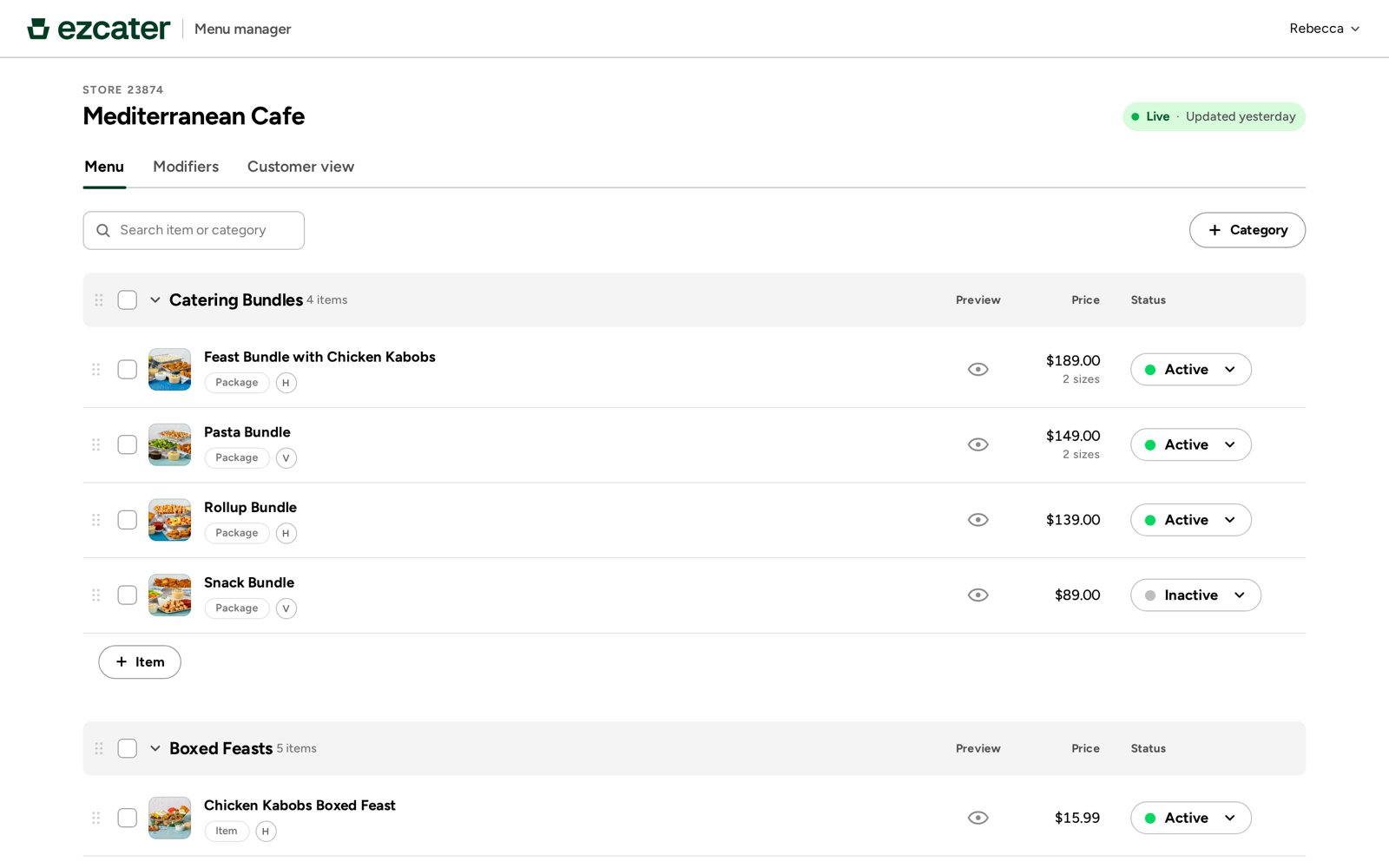
2. Half the menu doesn't need sizes. Half of catering items have no sizes, so items start with just a price and servings. + Size adds the rest. We also pushed the platform team to make size part of the item, not a modifier, and validated it in research. Items start with just a price and servings. + Size adds the rest.
3. Edit what the customer sees. Partners see their menu as customers do and can open any item's editor straight from the preview. It was partners' favorite feature in testing, and set us apart from competing tools. Partners open any item's editor straight from the customer preview. It was their favorite feature in testing.
Being able to see exactly what the customer sees before I publish, that's huge.
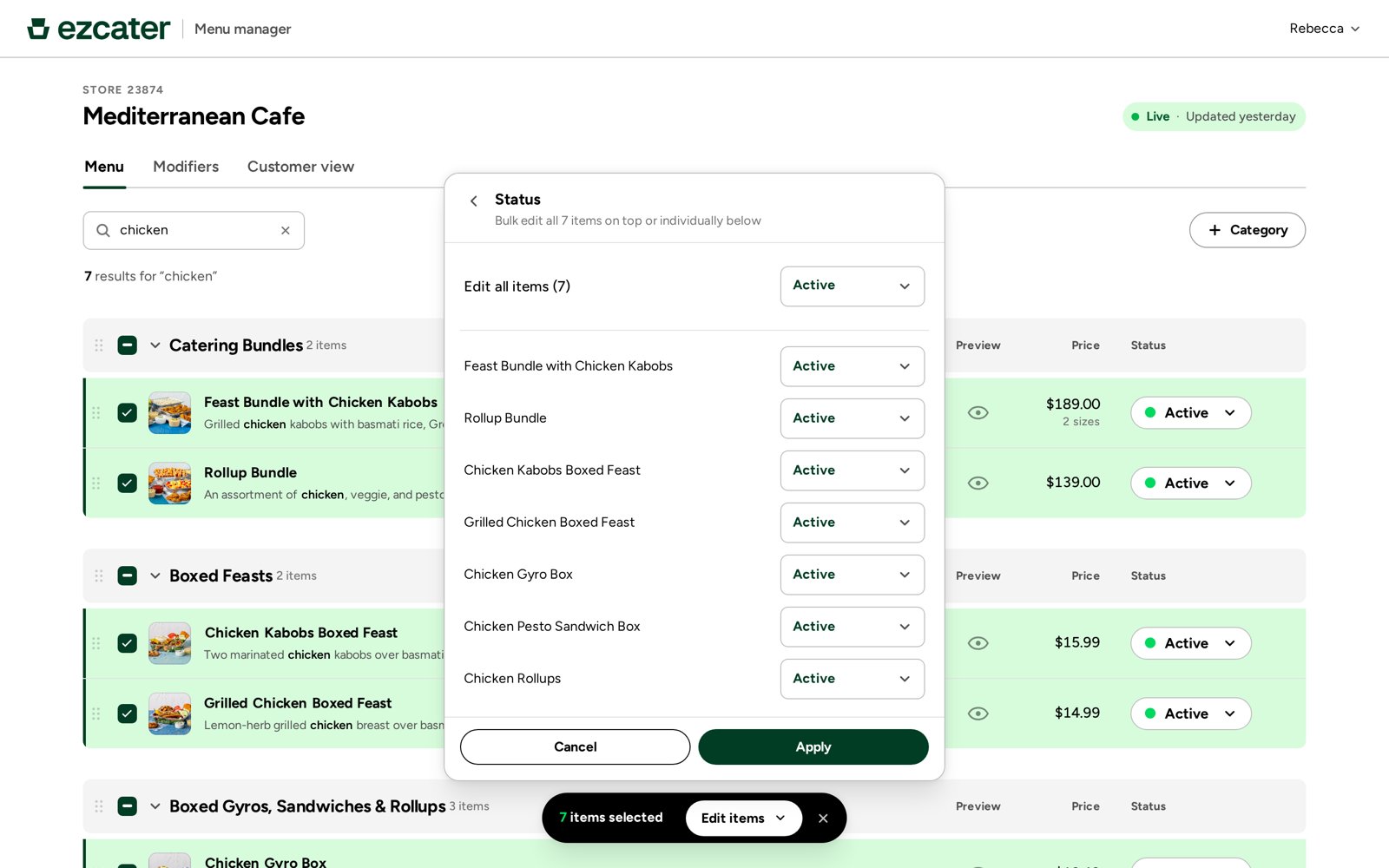
4. Experts keep their speed. Designing for partners first didn't slow down ezCater's menu experts. Bulk and multi-edit share one panel: set one price for every selected item, watch each row update, then fine-tune any single item in place. Bulk and multi-edit give the menu experts their speed back in the same tool.
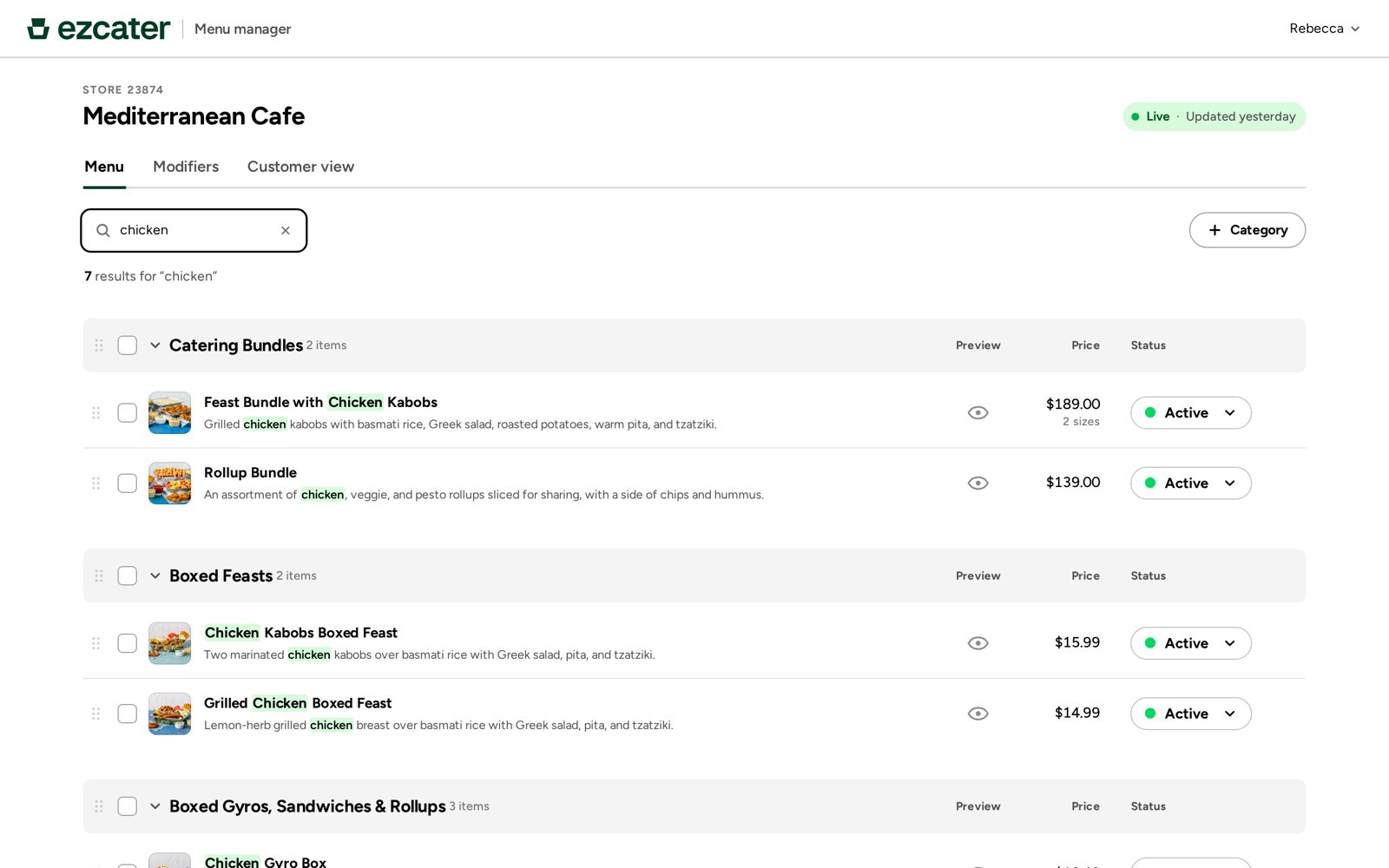
Out of chicken? Search "chicken," select the matches and mark them all inactive. What used to take a form and a week takes seconds. Select the matches and mark them inactive in seconds, not a week.
Designed, validated, half built
The editor was fully designed and tested well with partners. About half was built when I left. Success is measured by the share of menu updates partners make with no help from ezCater.
Fully designed and tested well with partners. About half was built when I left.
If this were available tomorrow, I'd jump right on it.
Takeaways
- Simplify without hiding power. Each decision removes a choice partners didn't need, while size pricing and bulk editing stay there for menus that need them. Designing for the least expert user first didn't cost the experts. Remove choices partners don't need, and keep the power for menus that need it.
- Design beyond the screen. Making size part of the item changed the platform's data model, not just the UI. Size became part of the data model, not just the UI.
- Prototype at the speed of research. Restarting in Claude Design put a working prototype in front of partners fast enough to keep pace with research and engineering. Claude Design kept the prototype in step with research and engineering.
- Scope is a design decision. I cut the menu team's wish list to an MVP, then designed the features we kept to work together. Cut to an MVP, then made the features we kept work together.